AI Workflow Automation

Feedback reports that build themselves

A 20-node n8n pipeline that ingests guest reviews, runs them through Claude AI with 76 weeks of memory, generates branded reports, and delivers insights to Telegram — every week, zero hands.

RoleArchitect & Builder
ClientHoley Moley Golf Club (Fun Labs)
Stackn8n · Claude AI · Google Drive · Telegram
StatusLive in Production
See the Impact ↓ ← Back to Portfolio
Before & After

Before Manual Process

  • Export CSV from ReviewTrackers, read every review by hand
  • ~90 minutes per report, quality depends on who's doing it
  • No historical context, no fiscal calendar awareness
  • Reports frequently skipped when things got busy
  • Venue rating sitting at 4.06 stars (Jan 2025)

After Automated Pipeline

  • Drop a CSV, get a branded DOCX with AI analysis in 60 seconds
  • 76 weeks of self-built memory — the system learns from itself
  • Custom fiscal calendar engine, timezone-aware date boundaries
  • Auto-filed to Drive, instant Telegram summary to the team
  • Venue rating climbed to 4.89 stars over 15 months
90→1
Min per report
22
Nodes in pipeline
76
Weeks of memory
4.06→4.89
Venue rating

The problem with weekly reporting

Holey Moley Golf Club gets guest reviews across Google, Yelp, TripAdvisor, and Facebook — all funneled into ReviewTrackers. Every week, someone had to export a CSV, read through dozens of reviews, spot themes, calculate metrics against the company's custom fiscal calendar, and write a structured report for the management team's biweekly meeting.

The process took roughly 90 minutes, the output was inconsistent, and when things got busy it simply didn't get done. The feedback was there — we just weren't processing it fast enough to act on it.
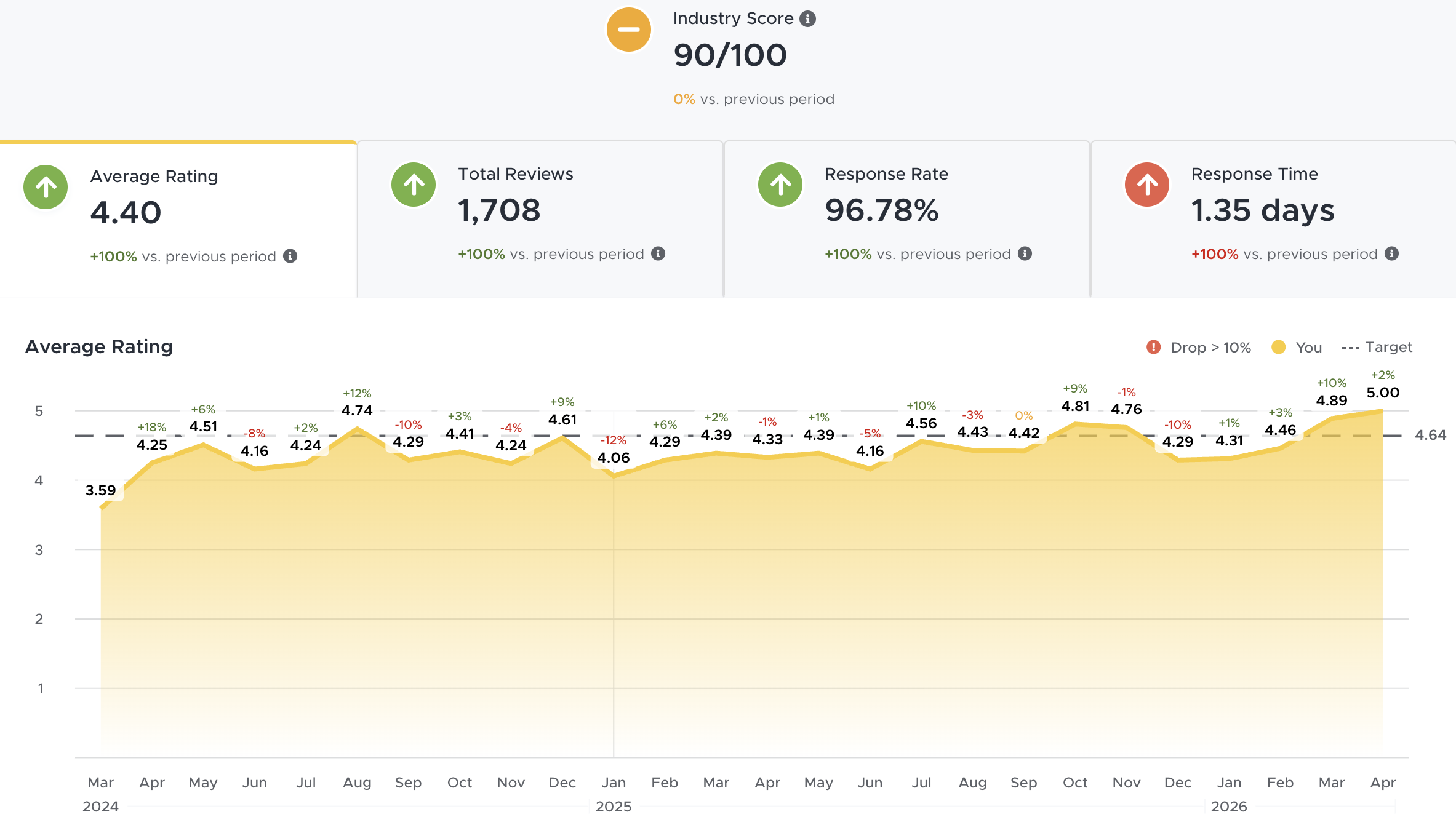
Fun Labs feedback dashboard showing review aggregation across platforms
Dashboard view — reviews aggregated from Google, Yelp, TripAdvisor, Facebook
⚠ Before
Manual CSV exports, hand-written summaries, inconsistent delivery
Someone had to read every review, spot themes by gut feel, calculate period/YTD metrics manually, and format the report in Google Docs. Quality depended entirely on who did it and how much time they had that week.
✓ After
Drop a CSV, get a branded report with AI analysis in 60 seconds
A 20-node n8n pipeline handles everything — CSV ingestion, fiscal week calculation, Claude AI analysis with 76 weeks of historical memory, DOCX generation, Google Drive filing, and Telegram delivery.
Three versions of the same idea

This system didn't start as a 20-node pipeline. It evolved through three distinct phases, each one solving the limitations of the last.

V1 — Manual
ChatGPT Custom Prompt
Staff paste reviews into a ChatGPT prompt, get structured summaries back. Fast for individuals but still required manual copy-paste and didn't generate formatted reports.
  • Manual CSV export
  • Copy-paste into ChatGPT
  • No metrics or fiscal context
  • No report formatting
V2 — Semi-Auto
Relevance AI Pipeline
Automated the AI analysis step but still required manual triggering, had no historical context, and couldn't generate formatted documents.
  • Automated AI analysis
  • Basic theme extraction
  • No historical comparison
  • No document generation
V3 — Autonomous
n8n + Claude Pipeline
Fully autonomous. Drop a CSV into Google Drive and the entire pipeline runs: fiscal week detection, AI analysis with 76-week memory, branded DOCX generation, auto-filing, and Telegram delivery.
  • Zero-touch operation
  • Self-updating memory
  • Branded DOCX output
  • Multi-channel delivery

The pipeline, node by node

Self-hosted on Docker via Cloudflare tunnel, running on an n8n instance at n8n.andre-espinoza.com. Here's how data flows from raw CSV to finished report.

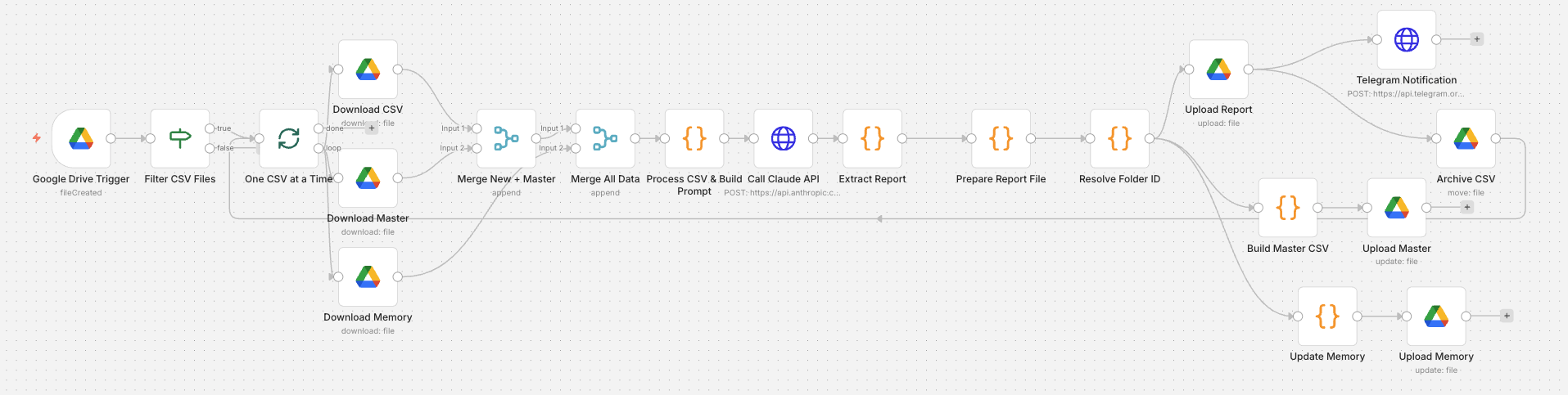
Full n8n workflow showing all 20 nodes in the feedback pipeline
The full 20-node n8n workflow — trigger to delivery
📥Google Drive
Trigger
Watches CSV folder
🔍Filter CSV
Files
Validates file type
Batch
Splitter
One CSV at a time
💾Download
CSV + Master + Memory
3 parallel downloads
🤖Process CSV
& Build Prompt
Fiscal calc + merge
Claude AI
API
Analysis + memory
📄Extract +
Prepare DOCX
Branded formatting
📁Upload +
Archive
Drive + Telegram
Trigger
Google Drive file watcher detects new CSV
A Google Drive trigger monitors the CSV Imports folder. When a new ReviewTrackers export lands there, the pipeline wakes up. The archive folder is kept separate to prevent trigger re-fire loops.
Ingest
Three parallel downloads: new CSV, master history, and report memory
The workflow downloads the uploaded CSV (current week), the master CSV (1,700+ reviews spanning 2 years), and the rolling memory file containing insights from 76 past reports. All three merge into a single rich dataset.
Process
Fiscal calendar engine determines the reporting week
A custom fiscal calendar (364-day year, 13 periods of 4 weeks, anchored to July 1) parses the CSV's latest review date — not the current date — to identify the exact fiscal year, period, and week number. Deleted reviews are filtered at source. Timezone-aware date helpers (startOfDay/endOfDay) ensure boundary reviews are counted correctly.
Analyze
Claude AI generates the report with full historical context
The processed data — current week reviews, prior week comparison, PTD/YTD metrics, and 76 weeks of narrative memory — is sent to the Claude API. Claude produces a structured report with theme analysis, sentiment breakdown, name drops, keyword trends, and week-over-week comparison. The 2-week comparative analysis is specifically designed for biweekly management meetings.
Generate
Branded DOCX with lime green headers, nested tables, and fiscal metadata
The report is rendered as a .docx file using the docx npm module (installed via custom Docker image). Anton for headers, Albert Sans for body copy, lime green (#C0FE4E) section headers, 7 structured sections plus Notable Happenings and Name Drops, with nested tables for Keyword Trends, Sentiment, and Staff mentions. Filename follows the format "HM ATX Feedback Report FYXX-XX PXX WKXX.docx".
Deliver
Auto-filed to fiscal year/period folder + Telegram summary
The DOCX uploads to the correct Google Drive subfolder based on fiscal year and period. The processed CSV moves to the archive folder. A structured summary with highlights, issues, trends, and venue standards gaps fires to the team's Telegram chat via direct Bot API call. Finally, the memory file updates with this week's insights for next time.

What makes this pipeline different

🧠
Self-Updating Memory System
After each report, the workflow extracts key metrics and narrative insights — executive summary, positive/negative trends, action items — and appends them to a rolling 52-week memory file in Google Drive. The next report downloads this memory, giving Claude full awareness of what's been improving, what's recurring, and what's new. The system literally learns from its own output.
Rolling 52-Week Window
Narrative + Metrics
📅
Custom Fiscal Calendar Engine
Fun Labs operates on a 364-day fiscal year (13 periods, 4 weeks each, anchored to July 1). The workflow implements this calendar natively — calculating the correct FY, period, and week number from any review date. This drives report naming, folder routing, and metric aggregation.
364-Day Year
13 Periods × 4 Weeks
Timezone-Aware Date Boundaries
ReviewTrackers exports UTC timestamps, but the venue operates in CST. A review posted at 2:31 AM UTC on January 12th is actually January 11th in local time. Custom startOfDay() and endOfDay() helpers normalize every date comparison, preventing the 0.44-point rating swings we discovered from boundary reviews crossing days.
UTC → CST Normalization
📑
Branded DOCX Generation
Reports aren't plain text — they're fully branded .docx files generated programmatically using the docx npm module. Anton display font for headers, Albert Sans for body, lime green section markers, nested tables for keyword trends and sentiment breakdowns. The custom Docker image enables external npm module access inside n8n Code nodes.
docx npm module
Custom Docker Image
📨
Dual-Channel Delivery
The DOCX report uploads to the correct fiscal year/period folder in Google Drive automatically. Simultaneously, a structured Telegram message fires to the team chat with highlights, flagged issues, venue standards gaps, and week-over-week comparisons — giving managers an instant preview without opening the document.
Google Drive Auto-Filing
Telegram Bot API
🔁
Batch Processing
If multiple CSVs accumulate (missed weeks, bulk uploads), a Split In Batches node processes them sequentially — one at a time through the full pipeline. Each report generates, uploads, and archives before the next begins, preventing race conditions and ensuring every week gets its own clean report.
Sequential Execution
Loop-Back Architecture
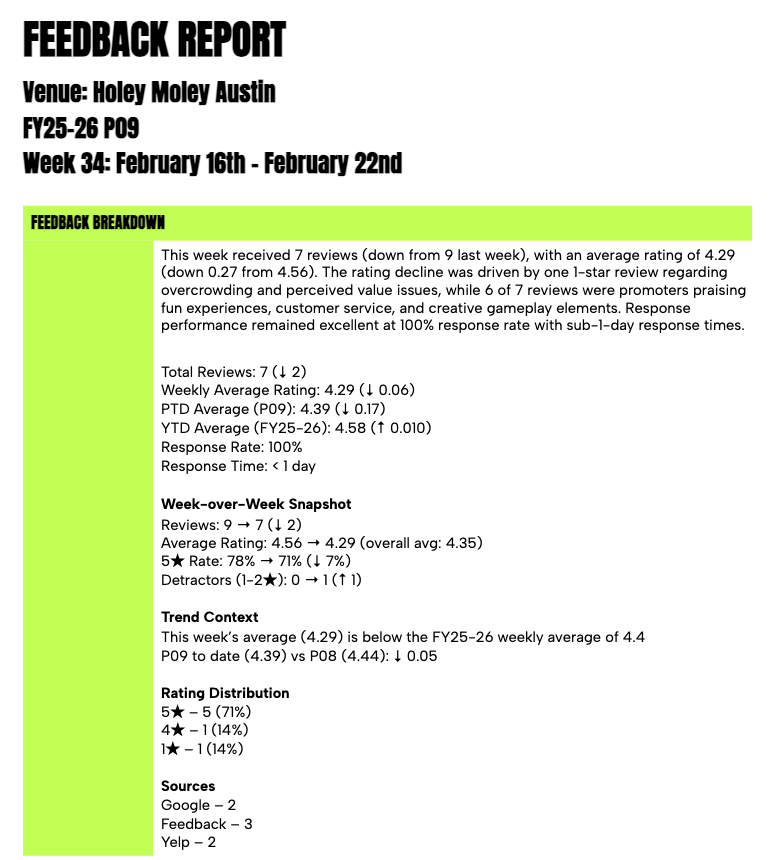
Generated DOCX report with branded lime green headers, sentiment tables, and fiscal metadata
Sample output — branded DOCX with fiscal metadata, sentiment tables, keyword trends

Problems that sharpened the system

This pipeline wasn't built in one pass. Each challenge exposed an assumption and forced a better solution.

1
Timezone Boundary Reviews
A 5-star review at 2:31 AM UTC on Jan 12th becomes Jan 11th in CST. A 1-star review at 3:14 AM UTC on Jan 19th becomes Jan 18th. Swapping those two reviews in and out of the same week caused a 0.44-point swing in the average rating — the difference between "good week" and "concerning trend."
Solution
Built startOfDay() and endOfDay() helper functions that normalize all date comparisons to midnight boundaries. Applied consistently across prior week, prior period, PTD, and YTD calculations.
2
Report Week Determination
The workflow merges the uploaded CSV with a master file containing 2 years of history. The original logic used the latest date from the merged dataset to determine the report week — meaning if the master contained newer reviews than the upload, the report would target the wrong week entirely.
Solution
Separated binary data reading into distinct new vs. master sources. The fiscal week is now determined exclusively from the uploaded CSV's date range (newLatestDate), while the master is used only for historical comparison data.
3
Deleted Review Ghost Data
ReviewTrackers keeps deleted reviews in the CSV with a deletion timestamp. These ghost reviews were contaminating counts and skewing averages at multiple points in the pipeline, with some filters catching them and others missing them.
Solution
Filter deleted reviews once at the source — immediately after CSV parsing — rather than at multiple downstream points. Every subsequent calculation operates on clean, pre-filtered data.
4
Telegram Message Delivery
The native n8n Telegram node wasn't reliably delivering the full structured report message. The 2,692-character message body with formatted sections would intermittently fail or arrive truncated.
Solution
Replaced the native Telegram node with a direct HTTP Request to the Telegram Bot API. POST to the sendMessage endpoint with explicit Content-Type headers and JSON body specification bypasses the abstraction layer entirely.
5
n8n API Payload Format
Deploying workflow updates via the n8n API kept returning empty responses. The GET endpoint returns a complete workflow object with metadata fields, but the PUT endpoint silently rejects payloads that include those extra fields.
Solution
Built a payload extraction step that strips the response down to only the fields the PUT endpoint accepts: nodes, connections, name, and settings. Clean payloads, clean deploys.

What powers the pipeline

n8n (Self-Hosted)
Claude AI API
Google Drive API
Telegram Bot API
ReviewTrackers
docx (npm)
Docker
Cloudflare Tunnel
JavaScript (n8n Code Nodes)

The numbers

98%
Reduction in manual work
(90 min → ~1 min)
1,700+
Historical reviews processed
for context
76
Weeks of self-built
report memory
4.06→4.89
Venue rating over
15 months
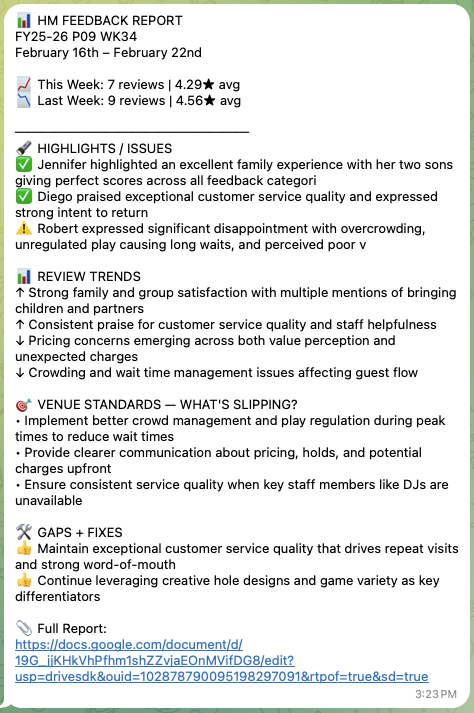
Telegram message showing automated weekly report summary delivered to team chat
Telegram delivery — instant structured summary hits the team chat
"The system doesn't just save time — it remembers. Every week's report is informed by every report that came before it. Patterns that would take a human months to notice get flagged in the first week they appear."
— Andre Espinoza

What building this taught me

This wasn't a tutorial project or a proof of concept. It's a production system that a real team relies on every week. Built this on the clock — had to think about edge cases that only show up with real data, and solve each one permanently.

🛠
AI needs engineering
Sending data to an AI model is easy. Building the pipeline that cleans, contextualizes, and delivers that data reliably every week — that's the real work. The AI is 10% of the system; the other 90% is infrastructure.
📈
Memory changes everything
A report without context is just a summary. A report that knows what happened last week, last month, and last quarter becomes strategic intelligence. The self-updating memory system is what turned this from useful to indispensable.
🐛
Edge cases are the product
The timezone bug that caused a 0.44-point rating swing. The deleted reviews contaminating averages. The fiscal calendar that doesn't follow standard months. These aren't footnotes — they're the reason this system exists.

Try it yourself

The full 22-node workflow is open source — credentials stripped, venue-specific strings genericized, fiscal calendar constants configurable. Clone it, import into n8n, connect your own Google Drive and Anthropic keys, drop a CSV, and get a report in 60 seconds. Deep-dive into the build, including the v1 → v2 story and the annotated Claude prompt, lives in the repo's notes/ folder.

Got messy data and manual processes?

This project turned scattered guest feedback into structured weekly intelligence. Let's talk about what your data could look like with the right pipeline.